
-
ProductAs the first company in the country to develop and produce explosion-proof touch screens, computers, HMIs, and related products, Xuyong has been a pioneer in industrial safety and innovation for over 20 years.
-
EquipmentAs the first company in the country to develop and produce explosion-proof touch screens, computers, HMIs, and related products, Xuyong has been a pioneer in industrial safety and innovation for over 20 years.
-
SolutionAs the first company in the country to develop and produce explosion-proof touch screens, computers, HMIs, and related products, Xuyong has been a pioneer in industrial safety and innovation for over 20 years.
-
AboutAs the first company in the country to develop and produce explosion-proof touch screens, computers, HMIs, and related products, Xuyong has been a pioneer in industrial safety and innovation for over 20 years.

How to choose proper explosion proof computers?
2026-04-13 01:23
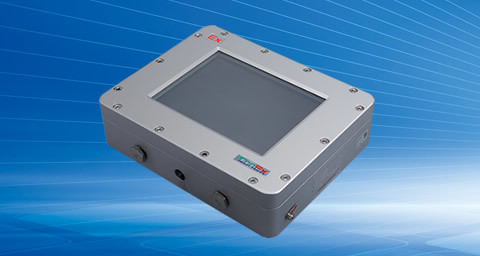
Our company, Shenzhen Xuyong Technology Co., Ltd is one professional manufactuer of explosion-proof computers, our explosion-proof computers include Zone 1, 21 computers (XY800 series) and Zone 2, 21 computers (XY900 series). Our explosion-proof computers have ATEX, IECEx, CNEX certificates and many screen sizes for selection. Following are our advice to choose proper explosion proof computers.
Choosing a proper explosion-proof computer is a critical safety decision. The right device must not only survive a harsh environment but also be certified to ensure it will never be the source of an ignition.
This requires a systematic approach, moving from defining your hazardous area to evaluating the hardware and total cost of ownership.
Here is a step-by-step guide to making this important selection.
Step 1: Define Your Hazardous Area (The "Where")
Before looking at any computer, you must precisely define the hazardous environment where it will operate. This is the most crucial step, as it determines the required safety certification.
The classification systems vary by region, but the core principles are the same. This system include North Amercia standards and Europe & international standards.
Note: Most industrial computers are certified for the less demanding "Division 2" or "Zone 2" environments. If your application requires a "Division 1" or "Zone 1" device, you will need a more specialized and robust solution.
Action: Determine the specific classification of your work area. For example, an oil refinery control room might be a safe area, while the processing platform is likely a Class I, Division 2 (C1D2) or Zone 2 location.
Step 2: Identify the Correct Protection Concept (The "How")
Once you know the area classification, you can understand how the device is protected. There are two main approaches, which are often used together.
- Explosion-Proof Enclosure (Ex d) The device is housed in a heavy, robust enclosure that can contain an internal explosion without rupturing. It also prevents any flame or hot gas from escaping to the external atmosphere.
2 Intrinsic Safety (Ex i) The device's electrical circuits are designed to operate with such low voltage and current that they cannot produce a spark or generate enough heat to ignite a hazardous atmosphere, even under a fault condition.
Step 3: Evaluate Ruggedness and Environmental Protection
An explosion-proof computer must also withstand the physical rigors of its environment. Look for devices that meet these key standards:
Ingress Protection (IP) Rating: This measures resistance to dust and water.
For gas (Class I/Zone 2) environments: An IP54 rating is a common baseline requirement.
For dusty/wet (Class II) environments: Look for a much higher rating like IP65 or IP66, which means the device is dust-tight and protected against powerful water jets.
Shock and Vibration: In areas with heavy machinery (e.g., mining, drilling), look for computers tested to MIL-STD-810 standards.
Temperature Range: Verify the device's operating temperature range matches your environment. Typical ranges are -20°C to 60°C, but some applications require -40°C.
Step 4: Match Hardware and Performance to Your Task
With the safety and durability boxes checked, focus on the computing requirements for your specific application.
Operating System: Choose between Windows for better compatibility with specialized enterprise software, or Android for quick deployment, a rich app ecosystem, and flexible touch interfaces.
Performance: Balance your need for processing power with reliability. High-performance processors generate more heat, which can be a challenge in a sealed, fanless enclosure. For tasks like simple data logging or SCADA monitoring, a moderate processor is sufficient. For AI-powered visual inspection or complex data analysis, a more powerful industrial-grade CPU (like an Intel Core i7) is necessary.
I/O Ports: Verify the device has the necessary connectivity for your equipment. Common ports in industrial settings include RS-232/RS-485 serial ports, CAN bus, and M12 connectors (which are locked to prevent disconnection from vibration).
Screen Readability: If the device is used outdoors, ensure the screen has a high brightness rating (e.g., 1000 nits) and is readable in direct sunlight. It should also support glove-friendly touch operation.
Step 5: Verify Certifications and Choose a Reputable Supplier
This final step ensures compliance and long-term support.
Demand to See the Certificate: Always ask the supplier for a copy of the official ATEX, IECEx, or C1D2 certificate. Do not rely on marketing claims alone.
Check for Combined Certifications: If your company operates globally, choosing a device with multiple certifications (e.g., IECEx, ATEX, and C1D2) can simplify logistics and reduce costs associated with re-certification.
Evaluate the Supplier: Look for a partner with experience in your industry. Ask about their service network, warranty (up to 5 years is available), and the availability of spare parts like batteries and screens, as these will affect the total cost of ownership.
In summary, the correct selection process is: Classify the area → Identify the protection method → Match the ruggedness → Align the performance → Verify with a certificate.
Hope above information are useful for you. If you would like to know further information, welcome to contact us.
LATEST NEWS

Contact Us
7F, Bldg. 5A, Skyworth Innovation Valley, No. 1 Tangtou Rd., Shiyan, Bao’an District, Shenzhen, China 518108
Follow Us


Copyright © 2025 Shenzhen Xuyong Industry Co., Ltd. All Rights reserved.